
ProLiant DL140 Generation 2 Server Maintenance and Service Guide

Removal and replacement procedures 15
Drive bay configuration
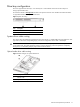
The server supports three drive bays—two drive bays for 1-inch hard disk drives and one drive bay for a
slim-type optical media drive.
Go to the HP website at www.hp.com
and refer to the options list for this server model for the latest information
on supported hard drives and optical media drives.
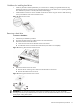
Figure 5 System drive bays
Item Description
1 1-inch hard disk drive bays (two)
2 Optical media device bay
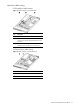
System drives cable routing
This section shows the cable routing diagrams for the system drives. For related cable routing procedure for each
type of drive, refer to the corresponding step(s) in the drive configuration sections later in this chapter.
CAUTION: Route the drive cables neatly. If necessary, secure them using the pre-installed cable clips located
on the chassis base. The cables should be routed in a position where they will not be pinched or crimped by
the top cover, nor should they hamper proper airflow inside the chassis.
Optical media drive cable routing
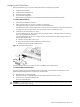
Figure 6 Cable routing for an optical media drive
Item Description
1 IDE data cable
2 Optical media drive power cable