
ProLiant DL140 Generation 2 Server Installation Sheet


Installing an Optional CD-ROM or
DVD Drive
The optical media device bay supports the installation of a
slim-type CD-ROM or DVD-ROM drive. Go to the HP website at
http://www.hp.com/
and refer to the options list for this server model
for a list of supported optical media drives.
To install an optional CD-ROM or DVD drive:
1. Perform the pre-installation procedures described earlier.
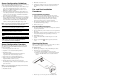
2. Prepare the optical media device bay for installation:
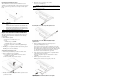
a. Pull up the optical media device bay release lever, then
push the drive carrier partially out through the front of the
chassis.
b.
Pull the drive carrier
out of the chassis.
c.
Remove the screw securing the drive carrier bezel.
d.
Detach the drive carrier bezel.
Store the drive carrier bezel (w
ith its screw) for reassembly
later.
CAUTION: Do not discard the drive carrier bezel. If the optical drive
is removed in the future, this bezel must be reinstalled in the
chassis for the proper cooling of the system.
3. Remove the new optical drive from its protective packaging.
The optical drive option kits in
clude mounting screws for drive
installation.
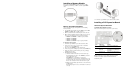
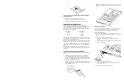
4. Install the new optical drive in its carrier:
a. Align the optical drive in the carrier.
b. Secure the drive with two mounting screws.
5. Install the new optical drive into the chassis:
a.
Slide the drive assembly into
the chassis until the optical
media device bay release lever snaps into place.
CAUTION: Route the optical drive cables neatly. If necessary,
secure them using the pre-installed cable clips located on the
chassis base. The cables should be
routed in a position where they
will not be pinched or crimped by the top cover, nor should they
hamper proper airflow inside the chassis.
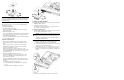
b. Route the optical drive’s power
cables through the cable
management opening of the chassis’ partition wall.
c. Connect the IDE data and power cables to their
corresponding connect
ors on the optical
drive’s backplane
board.
6. Perform the post-installation procedures described earlier.