
ProLiant DL140 Generation 2 Server Installation Sheet
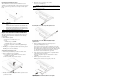


Installing the SCSI controller boar
d in the standa
rd height/full-
length expansion slot
8. Connect the necessary cabl
e(s) to the board.
Refer to the documentation that came with the board.
9. Perform the post-installation procedures described earlier.
Installing a Hard Drive
The server’s two 1-inch hard disk drive bays support both
non-hot-plug SCSI and SATA drives. The default system comes
with a single hard drive, the t
ype and capacity of which varies
based on the server model. The ProLiant server currently supports
the following drive capacities:
• SCSI HDD
— 36 GB
— 72 GB
• SATA HDD
—
80 GB
— 160 GB
— 250 GB
The SCSI drive and the 80 GB SATA drive options include only
the hard disk. Use the HDD carrier
s and mounting screws included
with your server to install these drives.
The 160- and 250-GB SATA drive options come with a hot-plug
HDD carrier. You need to remove the drives from their default
carriers before installing them in
the server. Use the HDD carriers
and mounting screws included with your server to install these
drives.
Go to the HP website at
http://www.hp.com/
and refer to the options
list for this server model for the latest information on supported
hard drives.
Hard Drive Installation Guidelines
Observe the following important guidelines when installing hard
drives:
• Install only hard drive models specified for your ProLiant
server. Installing unsupported hard drives may damage the
system by consuming power and generating heat in excess of
the server’s operating tolerance. This condition may result in a
loss of system and/or data integrity.
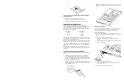
• Install hard disks in the drive
carriers included with the server
chassis using four of the six HD
D screws pre-installed in each
of the two HDD carriers.
• Hard drives installed in the server are labeled as Device 0 and
Device 1 from left to right when viewed from the front of the
server.
Removing a Hard Drive
If you intend to install a new hard
drive in an occupied drive bay,
remove the old drive first. Use
the drive carrier and screws you
removed from the old drive to install the new hard drive.
To remove a hard drive:
1. Perform the pre-installation procedures described earlier.
2. Disconnect the data and power cables from the rear of the hard
drive.
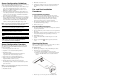
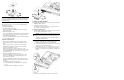
3. Remove the hard drive from the chassis:
a. Loosen the screw that secures the HDD carrier to the
chassis.
b. Push the HDD carrier towards th
e front of the chassis, then
slide it out completely.
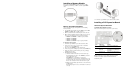
4. Remove the hard driv
e from its carrier:
a. Remove the four mounting screws that secure the hard
drive to the carrier.
b. Remove the hard driv
e from its carrier.