
HP ProLiant Intel-based 100-series G6 servers
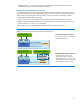
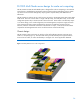
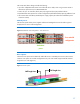
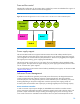
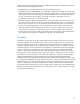

Figure 6 indicates that the ML100-series G6 and DL120 G6 servers have a dedicated Ethernet
management port. This port cannot be used by the system network.
Figure 6. LO100i sideband architecture for ML100-series G6 servers and the DL120 G6
Dedicated NIC
Dedicated NIC
Management Network
Embedded NIC
System Network
Port
LO100i
ML100 G6 series/DL120 G6
LO100i
Limited speed sideband
Embedded NIC
System Network
Port
ML100 G6 series/DL120 G6
Shared ML100 G6 & DL120 G6
Configuration
A limited speed shared network
configuration can be used for LO100
Standard features. LO100 Advanced
features, including Graphic Remote
Console and Virtual Media, are not
supported in shared network mode
Dedicated NIC ML100 G6 & DL120 G6
Configuration
The ML100 series G6/DL120 G6 ships
with a dedicated NIC port for
management. This NIC port can be
connected to the system network, or to a
separate management network. Virtual
KVM and Virtual Media are supported
in dedicated NIC configurations.
IPMI 2.0 and DCMI 1.0
ProLiant 100-series G6 servers and LO100i conform to IPMI 2.0 and DCMI 1.0 standards so that
customers in heterogeneous environments can manage these servers with either industry standard.
The following are basic compliance mandates:
The implementation of all mandatory IPMI 2.0 and DCMI 1.0 in-band and out-of-band commands
Reliable local and remote power on/off/reset through IPMI chassis commands
Per IPMI 2.0, console redirection over telnet or SSH
Identification of the server by device ID, globally unique identifier (GUID), asset tag, and chassis ID
Accurate System Event Logging using IPMI
Reliable in-band keyboard controller style (KCS) interface and out-of-band LAN interface
For more information on HP Lights-Out 100i Remote Management, go to www.hp.com/go/LO100
.
Server deployment
Prior to G6, ProLiant 100-series server administrators could not deploy servers using methods similar
to 300 series servers. The Easy Set-up CD now provides a user experience similar to SmartStart with
deployment tools that reduce the time required for server setup and updates.
Easy Set-up CDs and their ISO images are provided with each ProLiant G6 100-series server and are
used to perform assisted installations for one or two servers. Users performing multi-server installations
involving large numbers of servers require the following deployment tools:
Software Smart Components — Self-executable software consisting of driver and software
24