
Processor Option Installation Instructions for HP ProLiant BL685c Server Blades
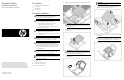
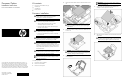

9. Press down firmly until the proce
ssor installation tool clicks and
separates from the processor, and then remove the processor
installation tool.
10.
Close the processor retainin
g bracket and the processor
retaining latch.
11.
Remove the thermal interface protective cover from the
heatsink.
IMPORTANT:
Do not install the air baffles on heatsinks for
processors 3 and 4.
12. If the heatsink will be installed
on processor 1 or 2, expose the
adhesive and apply the air baffles
to the side of the heatsink
that will face the center of the server.
13.
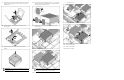
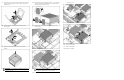
Align the holes in the heatsink with the guide pins on the
processor cage:
o
Processor 3 or 4
o Processor 1 or 2
CAUTION:
Heatsink retaining screws should be tightened
in diagonally opposite pairs (in an "X" pattern).
14. Install the heatsink:
o Processor 3 or 4
o Processor 1 or 2
15.
Repeat these steps for the second processor and heatsink.
16. Install the access panel.
17.
Install the server blade.
The installation is complete.