
HP ProLiant BL685c G7 Server Blade Maintenance and Service Guide


Cabling 48
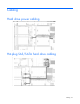
Cache module capacitor pack cabling
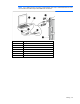
Using the HP c-Class Blade SUV Cable
The HP c-Class Blade SUV Cable enables the user to perform server blade administration, configuration, and
diagnostic procedures by connecting video and USB devices directly to the server blade. For SUV cable
connectors, see "HP c-Class Blade SUV Cable (on page 61)."
Connecting locally to a server blade with video and
USB devices
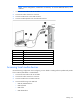
Use the SUV cable to connect a monitor and any of the following USB devices:
• USB hub
• USB keyboard
• USB mouse
• USB CD/DVD-ROM drive
• USB diskette drive
Numerous configurations are possible. This section offers two possible configurations. For more information,
see "USB support and functionality (on page 53)."
Accessing a server blade with local KVM
CAUTION:
Before disconnecting the SUV cable from the connector, always squeeze the release
buttons on the sides of the connector. Failure to do so can result in damage to the equipment.