
HP ProLiant BL685c G7 Server Blade Maintenance and Service Guide


Removal and replacement procedures 26
DIMM baffle
CAUTION: To avoid damage to the server blade and the enclosure, install all DIMM baffles in
the proper location after adding or replacing DIMMs. DIMM baffles that are missing or installed
incorrectly can compromise server blade and enclosure cooling.
To remove the component:
1. Power down the server blade (on page 22).
2. Remove the server blade (on page 23).
3. Remove the access panel ("Access panel" on page 24).
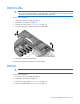
4. Disconnect the cables, and then remove the DIMM baffle.
5. Remove the remaining DIMM baffle.
To replace the component, reverse the removal procedure.
DIMMs
CAUTION: Use only HP DIMMs. DIMMs from other sources may adversely affect data integrity.
To remove the component:
1. Power down the server blade (on page 22).
2. Remove the server blade (on page 23).
3. Remove the access panel ("Access panel" on page 24).
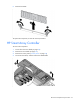
4. Remove all DIMM baffles ("DIMM baffle" on page 26).