
HP ProLiant BL685c Generation 5 Server Maintenance and Service Guide

Removal and replacement procedures 39
To replace the component:
CAUTION: The pins on the processor socket are very fragile. Any damage to them may require
replacing the system board.
CAUTION: Failure to completely open the processor locking lever prevents the processor from
seating during installation, leading to hardware damage.
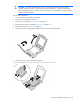
IMPORTANT: Be sure the processor remains inside the processor installation tool.
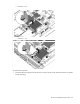
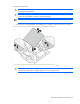
1. If the processor has separated from the installation tool, carefully re-insert the processor in the tool.
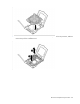
2. Align the processor installation tool with the socket and install the processor.
CAUTION: The processor is designed to fit one way into the socket. Use the alignment guides on
the processor and socket to properly align the processor with the socket.