
HP ProLiant BL660c Gen8 Server Blade Maintenance and Service Guide



Removal and replacement procedures 43
3.
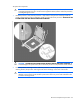
Press and hold the processor retaining bracket in place, and then close each processor locking lever.
Press only in the area indicated on the processor retaining bracket.
4. Align and install the heatsink. Alternate tightening the screws until the heatsink is seated properly.
5. Install all DIMM baffles ("DIMM baffles" on page 27).
6. Install the front panel/drive cage assembly ("Front panel/drive cage assembly" on page 37).
7. Disconnect all cables from the drive backplane. For more information, see "Cabling (on page 64)."
8. Install all FBWC capacitor packs.
9. Install all drives ("Drive" on page 25).
10. Install the access panel ("Access panel" on page 24).