
HP ProLiant BL660c Gen8 Server Blade Maintenance and Service Guide





Removal and replacement procedures 36
5.
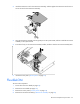
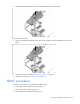
Remove the cache module.
Recovering data from the FBWC
If the server blade fails, use the following procedure to recover data temporarily stored in the FBWC.
CAUTION: Before starting this procedure, read the information about protecting against
electrostatic discharge ("Preventing electrostatic discharge" on page 21).
1. Set up a recovery server blade station using an identical server blade model. Do not install any internal
drives or FBWC in this server blade. (HP recommends this option.)
2. Power down the failed server blade ("Power down the server blade" on page 22).
3. Transfer the hard drives from the failed server blade to the recovery server blade station.
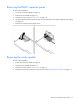
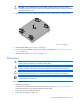
4. Remove the cache module (if installed) and capacitor pack from the failed server blade, and install the
cache module (if installed) and capacitor pack in the recovery server blade.
5. Power up the recovery server blade.
If data was saved on the cache module, then a 1792 POST message appears, stating that valid data
was flushed from the cache. This data is now stored on the drives in the recovery server blade.
If the SAS controller fails, use the following procedure to recover data temporarily stored in the FBWC.
CAUTION: Before starting this procedure, read the information about protecting against
electrostatic discharge ("Preventing electrostatic discharge" on page 21).
1. Set up a recovery server blade station using an identical server blade model. Do not install any internal
drives or FBWC in this server blade. (HP recommends this option.)
2. Power down the failed server blade ("Power down the server blade" on page 22).
3. Transfer the hard drives from the failed server blade to the recovery server blade station.
4. Remove the cache module and capacitor pack from the failed server blade, and install the cache
module and capacitor pack in the recovery server blade.
5. Power up the recovery server blade.
If data was saved on the cache module, then a 1792 POST message appears, stating that valid data
was flushed from the cache. This data is now stored on the drives in the recovery server blade.