
HP ProLiant BL660c Gen8 Server Blade Maintenance and Service Guide





Removal and replacement procedures 35
Removing the FBWC capacitor packs
To remove the component:
1. Power down the server blade (on page 22).
2. Remove the server blade (on page 23).
3. Remove the access panel ("Access panel" on page 24).
4. Locate the capacitor pack on the drive cage. For more information, see "FBWC capacitor pack cabling
(on page 64)."
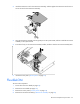
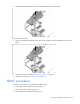
5. Remove the capacitor pack from the carrier.
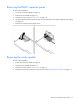
Removing the cache module
To remove the component:
1. Power down the server blade (on page 22).
2. Remove the server blade (on page 23).
3. Remove the access panel ("Access panel" on page 24).
4. Remove the mezzanine assembly for mezzanine connector 3 ("Mezzanine assembly" on page 30).