
HP ProLiant BL660c Gen8 Server Blade Installation Instructions

Installing a server blade
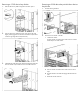
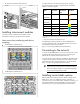
1. Remove the connector covers.
2. Install the server blade.
Assembling a full height blank
CAUTION: To prevent improper cooling and thermal
damage, do not operate the server blade or the enclosure
unless all drive and device bays are populated with either
a component or a blank.
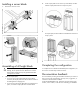
1. Obtain the coupler plate:
o If you are using a device bay blank that came with the
enclosure, the coupler plate can be found with the contents of
the full-height device shipping box.
o If you are using a device bay blank that you purchased as an
option, remove the coupler plate from inside the blank.
2. Fit the coupler plate into the slots on top of the blank, and then
slide the coupler plate back until it snaps into place.
3. Fit the slots on the bottom of the second blank on to the tabs on
the coupler plate, and then slide the second blank forward until it
snaps in place.
4. Install the full-height blank into the device bay.
Completing the configuration
To complete the server blade and HP BladeSystem configuration, see
the overview card that ships with the enclosure.
Documentation feedback
HP is committed to providing documentation that meets your needs. To
help us improve the documentation, send any errors, suggestions, or
comments to Documentation Feedback
(mailto:docsfeedback@hp.com). Include the document title and part
number, version number, or the URL when submitting your feedback.