
HP ProLiant BL660c Gen8 Server Blade Installation Instructions

Removing a c7000 device bay divider
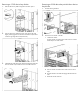
1. Slide the device bay shelf locking tab to the left to open it.
2. Push the device bay shelf back until it stops, lift the right side
slightly to disengage the two tabs from the divider wall, and then
rotate the right edge downward (clockwise).
3. Lift the left side of the device bay shelf to disengage the three tabs
from the divider wall, and then remove it from the enclosure.
Removing a c3000 device bay mini-divider or device
bay divider
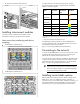
1. Slide the locking tab down.
2. Remove the mini-divider or divider:
o c3000 mini-divider:
Push the divider toward the back of the enclosure until the
divider drops out of the chassis.
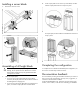
o c3000 divider:
a. Push the divider toward the back of the enclosure until it
stops.
b. Slide the divider to the left to disengage the tabs from the
wall.
c. Rotate the divider clockwise.