
HP ProLiant BL620c G7 Server Blade Maintenance and Service Guide
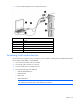
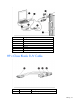
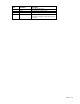
Table Of Contents
- HP ProLiant BL620c G7 Server Blade Maintenance and Service Guide
- Abstract
- Notice
- Contents
- Customer self repair
- Illustrated parts catalog
- Removal and replacement procedures
- Required tools
- Safety considerations
- Server blade preparation
- Access panel
- Hard drive blank
- Hard drive
- Mezzanine connector cover
- Left DIMM baffle
- Right DIMM baffle
- DIMM
- Heatsink blank
- Mezzanine card
- Front panel/hard drive cage assembly
- Battery-backed write cache procedures
- Heatsink
- Processor
- System board
- System battery
- Server blade release lever
- Release button
- HP Trusted Platform Module
- Diagnostic tools
- Server component identification
- Cabling
- Specifications
- Acronyms and abbreviations
- Index
Cabling 65
Cabling
Using the HP c-Class Blade SUV Cable
The HP c-Class Blade SUV Cable enables the user to perform server blade administration, configuration, and
diagnostic procedures by connecting video and USB devices directly to the server blade. For SUV cable
connectors, see "HP c-Class Blade SUV Cable (on page 67)."
Connecting locally to a server blade with video and
USB devices
Use the local I/O cable to connect a monitor and any of the following USB devices:
• USB hub
• USB keyboard
• USB mouse
• USB CD/DVD-ROM drive
• USB diskette drive
• USB drive key
Numerous configurations are possible. This section offers two possible configurations. For more information,
see "USB support and functionality (on page 58)."
Accessing a server blade with local KVM
CAUTION: Before disconnecting the SUV cable from the connector, always squeeze the release
buttons on the sides of the connector. Failure to do so can result in damage to the equipment.
NOTE: For this configuration, a USB hub is not necessary. To connect additional devices, use a
USB hub.
1. Connect the SUV cable to the server blade.
2. Connect the video connector to a monitor.
3. Connect a USB mouse to one USB connector.