
HP ProLiant BL620c G7 Server Blade Maintenance and Service Guide
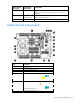
Table Of Contents
- HP ProLiant BL620c G7 Server Blade Maintenance and Service Guide
- Abstract
- Notice
- Contents
- Customer self repair
- Illustrated parts catalog
- Removal and replacement procedures
- Required tools
- Safety considerations
- Server blade preparation
- Access panel
- Hard drive blank
- Hard drive
- Mezzanine connector cover
- Left DIMM baffle
- Right DIMM baffle
- DIMM
- Heatsink blank
- Mezzanine card
- Front panel/hard drive cage assembly
- Battery-backed write cache procedures
- Heatsink
- Processor
- System board
- System battery
- Server blade release lever
- Release button
- HP Trusted Platform Module
- Diagnostic tools
- Server component identification
- Cabling
- Specifications
- Acronyms and abbreviations
- Index
Server component identification 62
Online/activity
LED (green)
Fault/UID LED
(amber/blue)
Interpretation
Off
Steadily amber A critical fault condition has been identified for this drive, and the
controller has placed it offline. Replace the drive as soon as
possible.
Off
Amber, flashing
regularly (1 Hz)
A predictive failure alert has been received for this drive. Replace
the drive as soon as possible.
Off
Off The drive is offline, a spare, or not configured as part of an array.
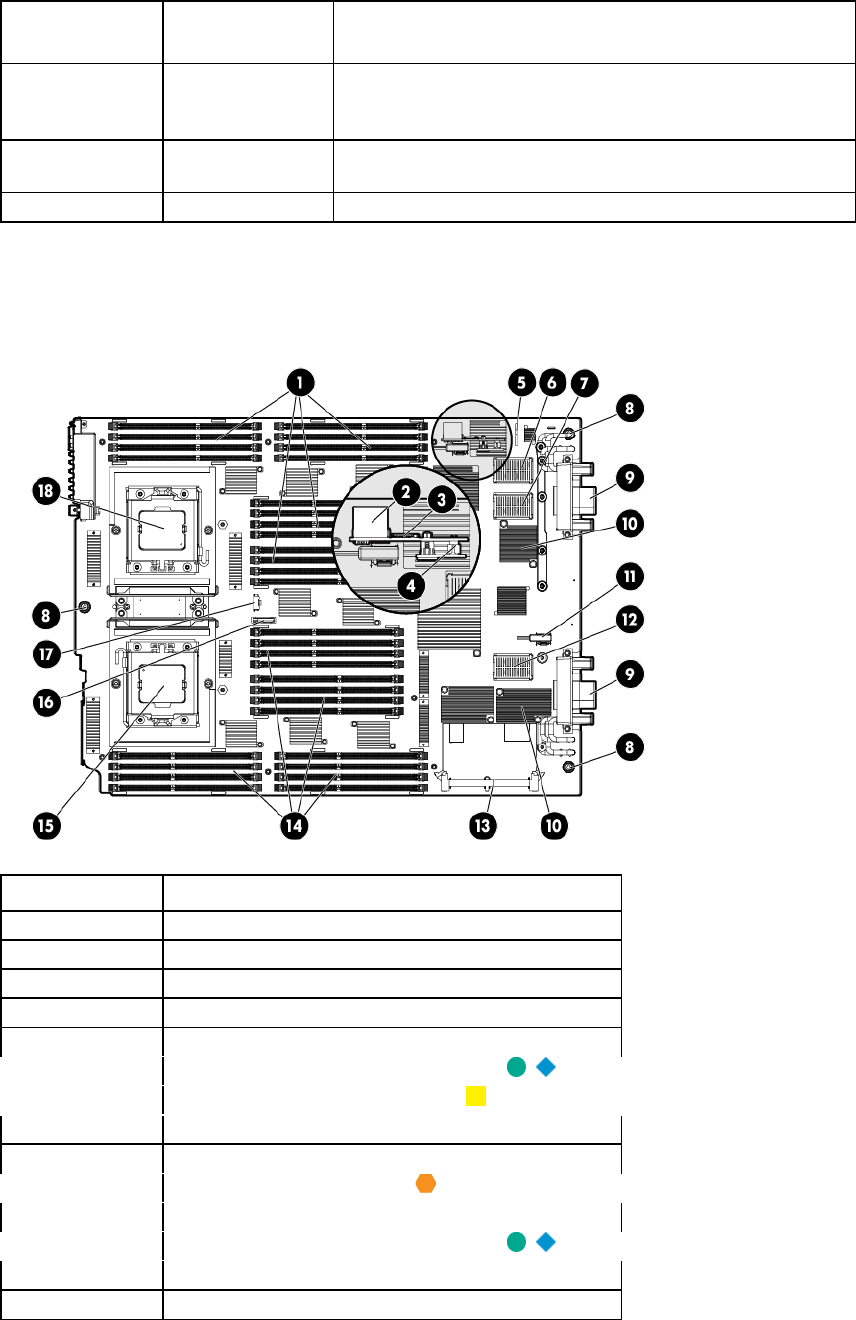
System board components
Item Description
1
Processor 2 DIMM slots (16)
2
USB connector
3
Micro SDHC card connector
4
TPM connector
5
System maintenance switch
6
Mezzanine connector 2 (Type I or Type II)
7
Mezzanine connector 1 (Type I only)
8
System board thumbscrews (3)
9
Enclosure connectors (2)
10
Embedded FlexFabric adapter
11
SAS/SATA signal connector
12
Mezzanine connector 3 (Type I or Type II)
13
Cache module connector
14
Processor 1 DIMM slots (16)