
HP ProLiant BL495c Generation 5 Server Blade User Guide

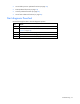
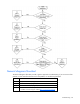
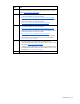
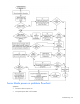
Table Of Contents
- HP ProLiant BL495c Generation 5 Server Blade User Guide
- Notice
- Contents
- Component identification
- Operations
- Setup
- Hardware options installation
- Cabling
- Software and configuration utilities
- Server blade deployment tools
- Configuration tools
- Management tools
- Automatic Server Recovery
- ROMPaq utility
- iLO 2 technology
- Erase Utility
- StorageWorks library and tape tools
- HP Systems Insight Manager
- Management Agents
- HP ProLiant Essentials Virtualization Management Software
- HP ProLiant Essentials Vulnerability and Patch Management Pack
- HP Insight Server Migration software for ProLiant
- HP ProLiant Essentials Performance Management Pack
- HP Insight Control Environment Suites
- HP Insight Control Linux Edition
- Redundant ROM support
- USB support and functionality
- Diagnostic tools
- Remote support and analysis tools
- Keeping the system current
- Troubleshooting
- Battery replacement
- Regulatory compliance notices
- Regulatory compliance identification numbers
- Federal Communications Commission notice
- Declaration of conformity for products marked with the FCC logo, United States only
- Modifications
- Cables
- Canadian notice (Avis Canadien)
- European Union regulatory notice
- Disposal of waste equipment by users in private households in private households in the European Union
- Japanese notice
- BSMI notice
- Korean notice
- Laser compliance
- Battery replacement notice
- Taiwan battery recycling notice
- Electrostatic discharge
- Specifications
- Technical support
- Acronyms and abbreviations
- Index
• Server blade power-on problems flowchart (on page 60)
•
erver indications flowchart (on page 66)
Start diagnosis flowchart
the follo stic process.
m R
POST problems flowchart (on page 62)
• OS boot problems flowchart (on page 64)
• S fault
Use wing flowchart to start the diagno
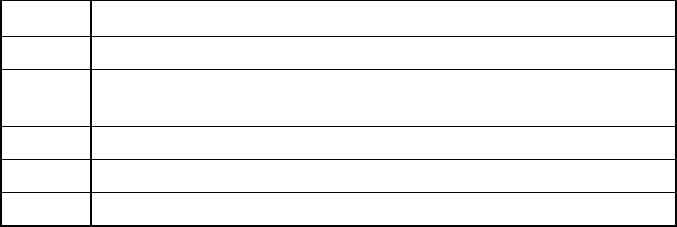
Ite efer to
1 "General diagnosis flowchart (on page 58)"
2 "
f
Power-on problems flowchart ("Server blade power-on problems
lowchart
" on page 60)"
3 "POST problems flowchart (on page 62)"
4 "OS boot problems flowchart (on page 64)"
5 "Server fault indications flowchart (on page 66)"
Troubleshooting 57