
HP ProLiant BL490c G7 Server Blade Installation Instructions
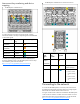

Installing a server blade
CAUTION: To prevent improper cooling and thermal
damage, do not operate the enclosure unless all bays
are populated with a component or a blank.
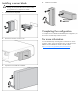
1. Remove the device bay blank.
2. Remove the enclosure connector cover.
3. Prepare the server blade for installation.
4. Install the server blade.
Completing the configuration
To complete the server blade and HP BladeSystem configuration, see
the overview card that ships with the enclosure.
For more information
For more detailed setup and configuration information as well as
regulatory, safety, and environmental notices, see the HP ProLiant
BL490c G7 Server Blade User Guide on the HP website
(http://www.hp.com/go/bladesystem/documentation
).