
HP ProLiant BL480c Server Blade User Guide
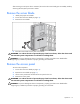

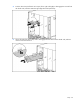
Table Of Contents
- HP ProLiant BL480c Server Blade User Guide
- Notice
- Contents
- Component identification
- Operations
- Setup
- Hardware options installation
- Cabling
- Software and configuration utilities
- Server blade deployment tools
- Configuration tools
- Management tools
- Automatic Server Recovery
- ROMPaq utility
- iLO 2 Standard Blade Edition technology
- Erase Utility
- StorageWorks library and tape tools
- HP Systems Insight Manager
- Management Agents
- HP ProLiant Essentials Virtualization Management Software
- HP ProLiant Essentials Server Migration Pack - Physical to ProLiant Edition
- HP BladeSystem Essentials Insight Control Data Center Edition
- Redundant ROM support
- USB support and functionality
- Diagnostic tools
- Remote support and analysis tools
- Keeping the system current
- Troubleshooting
- Battery replacement
- Regulatory compliance notices
- Regulatory compliance identification numbers
- Federal Communications Commission notice
- Declaration of conformity for products marked with the FCC logo, United States only
- Modifications
- Cables
- Canadian notice (Avis Canadien)
- European Union regulatory notice
- Disposal of waste equipment by users in private households in the European Union
- Japanese notice
- BSMI notice
- Korean notice
- Laser compliance
- Battery replacement notice
- Taiwan battery recycling notice
- Electrostatic discharge
- Specifications
- Technical support
- Acronyms and abbreviations
- Index
Operations 16
Install the access panel
1. Place the access panel on top of the server blade with the hood latch open. Allow the panel to
extend past the rear of the server blade approximately 0.8 cm (0.2 in).
2. Engage the anchoring pin with the corresponding hole in the latch.
3. Push down on the hood latch. The access panel slides to a closed position.