
HP ProLiant BL465c Gen8 Server Blade Maintenance and Service Guide



Removal and replacement procedures 48
6.
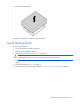
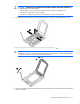
Apply all the grease to the top of the processor in the following pattern to ensure even distribution.
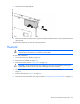
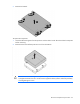
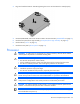
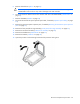
7. Align and install the heatsink. Alternate tightening the screws until the heatsink is seated properly.
8. Install the front panel/drive cage assembly ("Front panel/drive cage assembly" on page 39).
9. Install the DIMM baffle and connect the drive cable to the SAS controller ("DIMM baffle" on page 27).
10. Install all drives ("Drive" on page 25).
11. Install the access panel ("Access panel" on page 24).
12. Install the server blade.
System battery
If the server blade no longer automatically displays the correct date and time, you might have to replace the
battery that provides power to the real-time clock. Under normal use, battery life is 5 to 10 years.