
HP ProLiant BL465c Gen8 Server Blade Maintenance and Service Guide



Removal and replacement procedures 42
7.
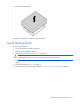
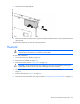
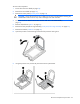
Remove the serial label pull tab.
8. Retain the information located on the original serial label pull tab and move it to the replacement serial
label pull tab.
To replace the component, reverse the removal procedure.
Heatsink
WARNING: To reduce the risk of personal injury from hot surfaces, allow the drives and the
internal system components to cool before touching them.
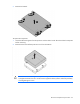
To remove the component:
1. Power down the server blade (on page 22).
2. Remove the server blade (on page 23).
3. Remove the access panel ("Access panel" on page 24).
CAUTION: Always disconnect the drive cables from the SAS controller before removing the
DIMM baffle. Failure to do so may result in damage to the SAS controller.
4. Disconnect the drive cables from the SAS controller and remove the DIMM baffle ("DIMM baffle" on
page 27).
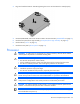
5. Remove all hard drives ("Drive" on page 25).
6. Remove the front panel/hard drive cage assembly ("Front panel/drive cage assembly" on page 39).