
HP ProLiant BL465c G7 Server Blade Maintenance and Service Guide

Removal and replacement procedures 45
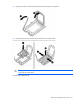
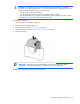
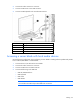
IMPORTANT: To avoid damage to the server blade, support the riser board when installing the
TPM board and rivet.
13. If necessary, install the TPM module. For more information, see the HP ProLiant BL465c G7 Server Blade
User Guide.
14. Install the access panel ("Access panel" on page 26).
After you replace the system board, you must re-enter the server blade serial number and the product ID.
1. During the server blade startup sequence, press the F9 key to access RBSU.
2. Select the Advanced Options menu.
3. Select Service Options.
4. Select Serial Number. The following warnings appear:
WARNING! WARNING! WARNING! The serial number is loaded into the system during
the manufacturing process and should NOT be modified. This option should only
be used by qualified service personnel. This value should always match the
serial number sticker located on the chassis.
Warning: The serial number should ONLY be modified by qualified personnel.
This value should always match the serial number located on the chassis.
5. Press the Enter key to clear the warning.
6. Enter the serial number and press the Enter key.
7. Select Product ID. The following warning appears:
Warning: The Product ID should ONLY be modified by qualified personnel. This
value should always match the Product ID on the chassis.
8. Enter the product ID and press the Enter key.
9. Press the Esc key to close the menu.
10. Press the Esc key to exit RBSU.
11. Press the F10 key to confirm exiting RBSU. The server blade automatically reboots.
HP Trusted Platform Module
The TPM is not a customer-removable part.
CAUTION: Any attempt to remove an inst
alled TPM from the system board breaks or disfigures
the TPM security rivet. Upon locating a broken or disfigured rivet on an installed TPM,
administrators should consider the system compromised and take appropriate measures to ensure
the integrity of the system data.
If you suspect a TPM board failure, leave the TPM installed and remove the system board. Contact an HP
authorized service provider for a replacement system board and TPM board.
System battery
If the server blade no longer automatically displays the correct date and time, you may need to replace the
battery that provides power to the real-time clock. Under normal use, battery life is 5 to 10 years.