
HP ProLiant BL465c G7 Server Blade Installation Instructions
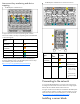

Interconnect bay numbering and device
mapping
• HP BladeSystem c7000 Enclosure
To support network connections for specific signals, install an
interconnect module in the bay corresponding to the embedded NIC
or mezzanine signals.
Server blade
signal
Interconnect bay Interconnect bay labels
NIC 1
(Embedded)
1
NIC 2
(Embedded)
2
Mezzanine 1 3 and 4
Mezzanine 2 5 and 6
7 and 8
For detailed port mapping information, see the HP BladeSystem
enclosure installation poster or the HP BladeSystem enclosure setup
and installation guide on the HP website
(http://www.hp.com/go/bladesystem/documentation
).
• HP BladeSystem c3000 Enclosure and Tower Enclosure
Server blade
signal
Interconnect
bay
number
Interconnect
bay label
Notes
NICs 1, 2
(embedded)
1
—
Mezzanine
1
2
Four port cards
connect to bay 2
Mezzanine
2
3,4
• Four port cards
• Ports 1 and 3
connect to bay
3
• Ports 2 and 4
connect to bay
4
Connecting to the network
To connect the HP BladeSystem to a network, each enclosure must
be configured with network interconnect devices to manage signals
between the server blades and the external network.
Two types of interconnect modules are available for HP BladeSystem
c-Class enclosures: Pass-thru modules and switch modules. For more
information about interconnect module options, see the HP website
(http://www.hp.com/go/bladesystem/interconnects
).
Installing a server blade