
HP ProLiant BL465c G6 Server Blade Maintenance and Service Guide

Component identification 60
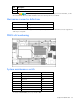
System maintenance switch procedures
When you perform troubleshooting steps, this guide may instruct you to perform the following procedures:
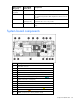
• Clear the system configuration ("Clearing the system configuration" on page 60).
• Access the redundant ROM ("Accessing the redundant ROM" on page 60).
To complete these procedures, you must change physical settings on the system maintenance switch.
Clearing the system configuration
To clear the system configuration:
1. Power down the server blade (on page 22).
2. Remove the server blade (on page 23).
3. Remove the access panel ("Access panel" on page 24).
4. Change position 6 of the system maintenance switch to on.
5. Install the access panel ("Access panel" on page 24).
6. Install the server blade in the enclosure and power up the server blade.
7. Wait for the POST message that prompts you to change the switch setting:
Maintenance switch detected in the "On" position.
Power off the server and turn switch to the "Off" position.
8. Repeat steps 1 through 3.
9. Change position 6 of the system maintenance switch to off.
10. Repeat steps 5 through 7.
IMPORTANT: When the server blade boots after NVRAM is cleared, a delay of up to 2
minutes is normal. During this delay, the system appears non-functional. Do not attempt any
procedures during the delay.
Accessing the redundant ROM
If the system ROM is corrupted, you can set the system to use the backup version or redundant ROM.
To use the redundant ROM:
1. Power down the server blade (on page 22).
2. Remove the server blade (on page 23).
3. Remove the access panel ("Access panel" on page 24).
4. Change positions 1, 5, and 6 of the system maintenance switch to on.
5. Install the access panel ("Access panel" on page 24).
6. Install the server blade in the enclosure and power up the server blade.
7. Repeat steps 1 through 3.
8. Change positions 1, 5, and 6 of system maintenance switch to off.
9. Repeat steps 5 through 7.
If both the current and backup versions of the ROM are corrupt, you must return the system board for a
service replacement.