
HP ProLiant BL465c Generation 5 Server Maintenance and Service Guide

Removal and replacement procedures 31
2.
Install the access panel ("Access panel" on page 24).
3. Install the server blade.
HP Smart Array E200i Controller cache module
To remove the component:
1. Power down the server blade (on page 23).
2. Remove the server blade (on page 23).
3. Remove the access panel ("Access panel" on page 24).
4. Remove all hard drives ("Hard drive" on page 25).
5. Remove all hard drive blanks ("Hard drive blank" on page 25).
6. Remove the hard drive backplane ("Hard drive backplane" on page 28).
7. Remove the front panel/hard drive cage assembly ("Front panel/hard drive cage assembly" on
page 29).
8. Remove the USB key, if any ("Component identification" on page 54, "System board components"
on page 57).
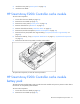
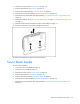
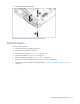
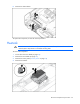
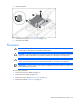
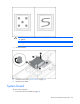
9. Remove the HP Smart Array E200i Controller cache module.
To replace the component, reverse the removal procedure.
HP Smart Array E200i Controller cache module
battery pack
The optional cache module battery pack provides the cache module with power to preserve cache data in
the event of an unexpected system shutdown.
To remove the component:
1. Power down the server blade (on page 23).
2. Remove the server blade (on page 23).