
HP ProLiant BL465c Generation 5 Server Maintenance and Service Guide

Removal and replacement procedures 30
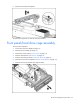
To replace the component, reverse the removal procedure.
Mezzanine card
Optional mezzanine cards enable network connectivity and provide Fibre Channel support. For
mezzanine card locations, see the system board components (on page 57).
To remove the component:
1. Power down the server blade (on page 23).
2. Remove the server blade (on page 23).
3. Remove the access panel ("Access panel" on page 24).
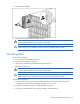
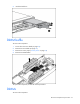
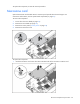
4. Remove the mezzanine card.
To replace the component:
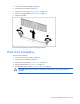
1. Install the mezzanine card. Press down above the back side of the connector to seat the card.