
HP ProLiant BL460c G6 Server Blade User Guide
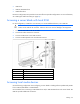
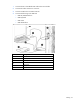
Table Of Contents
- HP ProLiant BL460c G6 Server Blade User Guide
- Abstract
- Notice
- Contents
- Component identification
- Operations
- Setup
- Hardware options installation
- Introduction
- Hard drive option
- Processor option
- Memory options
- Mezzanine card option
- Cache module and battery pack option
- HP Trusted Platform Module option
- Cabling
- Software and configuration utilities
- Troubleshooting
- Battery replacement
- Regulatory compliance notices
- Regulatory compliance identification numbers
- Federal Communications Commission notice
- Declaration of conformity for products marked with the FCC logo, United States only
- Modifications
- Cables
- Canadian notice (Avis Canadien)
- European Union regulatory notice
- Disposal of waste equipment by users in private households in the European Union
- Japanese notice
- BSMI notice
- Korean notice
- Chinese notice
- Laser compliance
- Battery replacement notice
- Taiwan battery recycling notice
- Acoustics statement for Germany (Geräuschemission)
- Electrostatic discharge
- Specifications
- Technical support
- Acronyms and abbreviations
- Index
Cabling 47
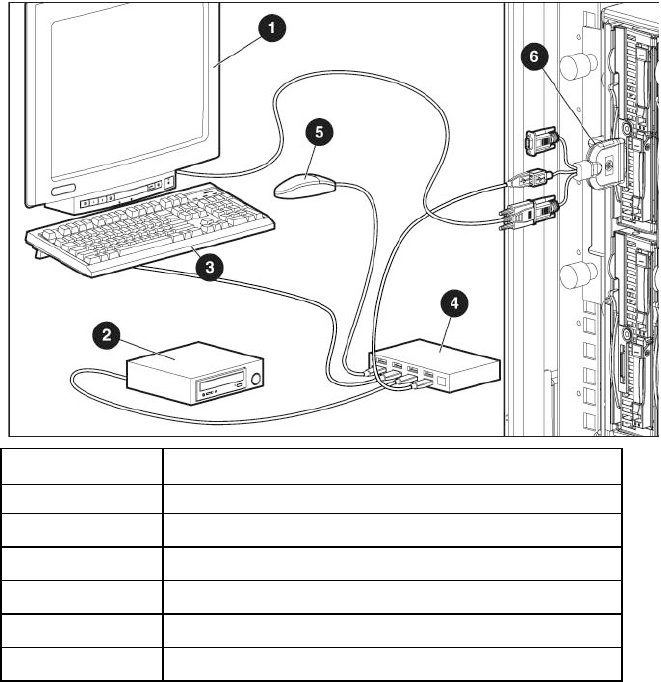
1. Connect the HP c-Class Blade SUV cable to the server blade.
2. Connect the video connector to a monitor.
3. Connect a USB hub to one USB connector.
4. Connect the following to the USB hub:
o USB CD/DVD-ROM drive
o USB keyboard
o USB mouse
o USB diskette drive
Item Description
1
Monitor
2
USB CD/DVD-ROM drive or diskette drive
3
USB keyboard
4
USB hub
5
USB mouse
6
HP c-Class Blade SUV Cable