
HP ProLiant BL460c G6 Server Blade User Guide
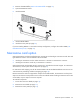
Table Of Contents
- HP ProLiant BL460c G6 Server Blade User Guide
- Abstract
- Notice
- Contents
- Component identification
- Operations
- Setup
- Hardware options installation
- Introduction
- Hard drive option
- Processor option
- Memory options
- Mezzanine card option
- Cache module and battery pack option
- HP Trusted Platform Module option
- Cabling
- Software and configuration utilities
- Troubleshooting
- Battery replacement
- Regulatory compliance notices
- Regulatory compliance identification numbers
- Federal Communications Commission notice
- Declaration of conformity for products marked with the FCC logo, United States only
- Modifications
- Cables
- Canadian notice (Avis Canadien)
- European Union regulatory notice
- Disposal of waste equipment by users in private households in the European Union
- Japanese notice
- BSMI notice
- Korean notice
- Chinese notice
- Laser compliance
- Battery replacement notice
- Taiwan battery recycling notice
- Acoustics statement for Germany (Geräuschemission)
- Electrostatic discharge
- Specifications
- Technical support
- Acronyms and abbreviations
- Index

Hardware options installation 33
• DIMM configuration on channel 1 and channel 2 of a processor must be identical.
• In multi-processor configurations, each processor must have a valid Lockstep Memory configuration.
• In multi-processor configurations, each processor may have a different valid Lockstep Memory
configuration.
Single-processor Lockstep population order
For Lockstep memory mode configurations with a single processor, populate the DIMM slots in the following
order:
• RDIMM
o First: A and B
o Next: D and E
o Do not populate slots C or F.
• UDIMM
o First: A and B
o Last: D and E
o Do not populate slots C or F.
After installing the DIMMs, use RBSU to configure the system for Lockstep memory support ("Configuring
lockstep memory" on page 57).
Multi-processor Lockstep population order
For Lockstep memory mode configurations with multiple processors, populate the DIMM slots for each
processor in the following order:
• RDIMM
o First: A and B
o Next: D and E
o Do not populate slots C or F.
• UDIMM
o First: A and B
o Last: D and E
o Do not populate slots C or F.
After installing the DIMMs, use RBSU to configure the system for Lockstep memory support ("Configuring
lockstep memory" on page 57).
Installing a DIMM
CAUTION: To avoid damage to the hard drives, memory, and other system components, the air
baffle, drive blanks, and access panel must be installed when the server is powered up.
1. Power down the server ("Power down the server blade" on page 12).
2. Remove the server blade (on page 13).
3. Remove the access panel (on page 14).