
HP ProLiant BL460c G6 Server Blade User Guide
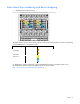
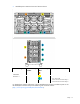
Table Of Contents
- HP ProLiant BL460c G6 Server Blade User Guide
- Abstract
- Notice
- Contents
- Component identification
- Operations
- Setup
- Hardware options installation
- Introduction
- Hard drive option
- Processor option
- Memory options
- Mezzanine card option
- Cache module and battery pack option
- HP Trusted Platform Module option
- Cabling
- Software and configuration utilities
- Troubleshooting
- Battery replacement
- Regulatory compliance notices
- Regulatory compliance identification numbers
- Federal Communications Commission notice
- Declaration of conformity for products marked with the FCC logo, United States only
- Modifications
- Cables
- Canadian notice (Avis Canadien)
- European Union regulatory notice
- Disposal of waste equipment by users in private households in the European Union
- Japanese notice
- BSMI notice
- Korean notice
- Chinese notice
- Laser compliance
- Battery replacement notice
- Taiwan battery recycling notice
- Acoustics statement for Germany (Geräuschemission)
- Electrostatic discharge
- Specifications
- Technical support
- Acronyms and abbreviations
- Index
Setup 16
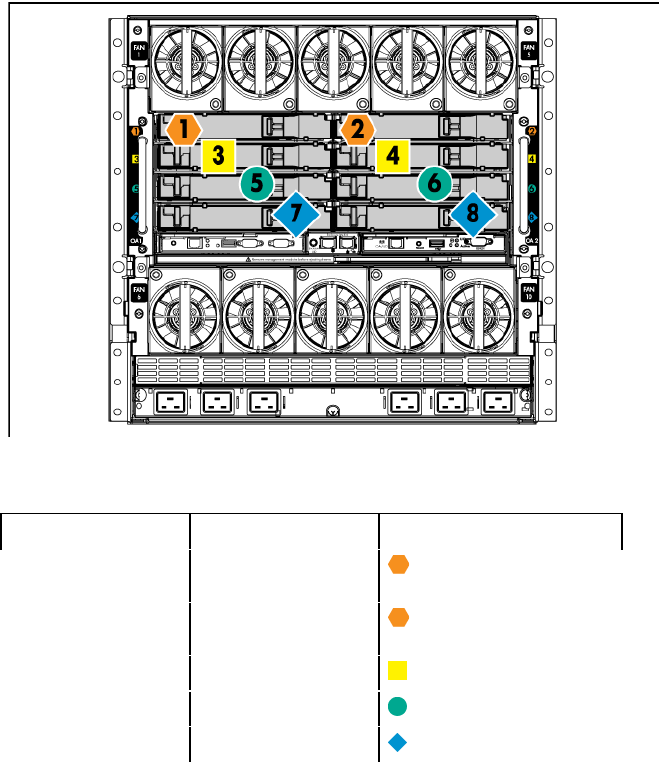
Interconnect bay numbering and device mapping
• HP BladeSystem c7000 Enclosure
To support network connections for specific signals, install an interconnect module in the bay corresponding
to the embedded NIC or mezzanine signals.
Server blade signal Interconnect bay Interconnect bay labels
Flex-10 NIC 1
(embedded)
1
Flex-10 NIC 2
(embedded)
2
Mezzanine 1
3 and 4
Mezzanine 2
5 and 6
7 and 8
For detailed port mapping information, see the HP BladeSystem enclosure installation poster or the
HP BladeSystem enclosure setup and installation guide on the HP website
(http://www.hp.com/go/bladesystem/documentation).