
HP ProLiant BladeSystem p-Class System Maintenance and Service Guide


Removal and Replacement Procedures 43
CAUTION: Each power enclosure has two or more power supply cords. A single rack or cabinet may contain
more than one power enclosure. Power may be supplied in a redundant fashion. Removing any single source
of power does not necessarily remove power from any portion of the system. When performing any service
other than hot-plug module replacement, you must completely disconnect all power to that portion of the
system.
CAUTION: When performing service procedures on server blade enclosures, ensure that both A and B DC
power feeds are disconnected from the enclosure before servicing.
CAUTION: When performing service procedures on power enclosures, shut off the circuit breakers to both A
and B AC power feeds and then disconnect both power cords from the wall outlet before servicing.
To remove AC input power from the 1U power enclosure:
1. Remove power from the facility power connection.
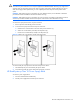
2. To remove AC input power from the 3U power enclosures:
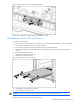
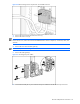
a. Unlock the AC circuit breakers on the rear of the power enclosures (1).
b. Set the AC circuit breakers (A and B) to the off position (2).
c. Lock the AC circuit breakers (A and B) in the off position (3).
Figure 2-19 Setting AC circuit breaker switches to the off position
To remove facility DC input power from bus bars and power bus boxes:
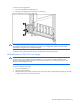
1. Shut off facility DC power to the facility DC power cables.
2. Disconnect the facility DC power cables from the facility connection.
HP BladeSystem p-Class 1U Power Supply Blank
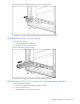
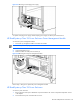
To remove a power supply blank:
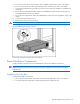
1. Press the release buttons simultaneously.
2. Pull the power supply blank out of the power enclosure.