
HP ProLiant BL45p Generation 2 Server Blade Maintenance and Service Guide

Removal and replacement procedures 28
Power down the server blade
Power down the server blade using either of the following methods:
• Press the Power On/Standby button on the server blade front panel.
Be sure that the server blade is in standby mode by observing that the system power LED is amber.
This process may take 30 seconds, during which time some internal circuitry remains active.
• Use the virtual power button feature in iLO 2.
After initiating a manual or virtual power down command, be sure that the server blade goes into
standby mode by observing that the system power LED is amber.
IMPORTANT: When the server blade is in standby mode, auxiliary power is still being
provided. To remove all power from the server blade, remove the server blade from the server
blade enclosure.
IMPORTANT: Remote power procedures require the most recent firmware for the power
enclosure and server blade enclosure management modules. For the most recent firmware,
refer to the HP website (http://www.hp.com/go/support
).
Remove the server blade
1. Identify the proper server blade.
2. Back up all server blade data.
3. Power down the server blade (on page 28).
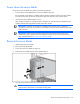
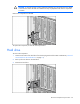
4. Remove the server blade from the server blade enclosure.
5. Place the server blade on a flat, level work surface.
WARNING: To reduce the risk of personal injury from hot surfaces, allow the drives and the
internal system components to cool before touching them.