
HP ProLiant BL420c Gen8 Server Blade MSG


Removal and replacement procedures 51
13.
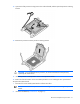
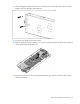
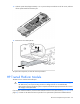
Open each of the processor locking levers in the order indicated, and then open the processor retaining
bracket.
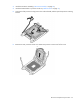
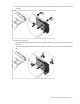
14. Remove the processor from the processor retaining bracket.
CAUTION: To avoid damage to the processor, do not touch the bottom of the processor,
especially the contact area.
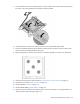
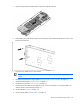
15. Install the processor socket protective cover in each processor socket.
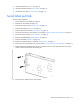
16. Retain all of the information on the serial label pull tab for use in installing the new system board.
To replace the system board:
1. Place the new server blade system board on a flat level surface.
IMPORTANT: Install all components in the same configuration prior to removing the system
board.
2. Install the FlexibleLOM ("FlexibleLOM" on page 35).