
HP ProLiant BL420c Gen8 Server Blade MSG


Removal and replacement procedures 30
DIMMs
IMPORTANT: This server blade does not support mixing LRDIMMs, RDIMMs, or UDIMMs.
Attempting to mix any combination of these DIMMs can cause the server to halt during BIOS
initialization.
To identify the DIMMs installed in the server blade, see "DIMM identification (on page 74)."
To remove the component:
1. Power down the server blade (on page 22).
2. Remove the server blade (on page 23).
3. Remove the access panel ("Access panel" on page 24).
4. Remove the SAS controller ("SAS controller" on page 27).
5. Remove all DIMM baffles ("DIMM baffles" on page 28).
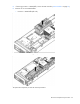
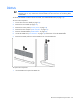
6. Locate the DIMM tool ("Tool locations" on page 75) and remove it from the DIMM baffle.
7. Remove the DIMM, and then use the DIMM tool to close the DIMM slot.
To replace the component:
1. Use the DIMM tool to open the DIMM slot.