
ProLiant BL40p Server Blade Maintenance and Service Guide
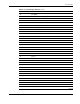
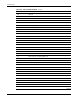
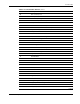
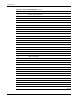

Port 84 Codes
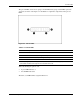
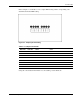
The port 84 LEDs consist of two groups of four LEDs. Each group of four LEDs represents
one character of the code. Figure 5-2 and Table 5-1 explain the components of the port 84
LEDs.
Figure 5-2: Port 84 LEDs
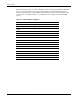
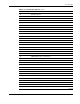
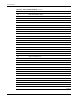
Table 5-1: Port 84 LEDs
Item Description
1 Front of the server blade*
2 First code character (Most Significant Bit)
3 Second code character (Least Significant Bit)
4 Rear of server blade*
* When reading the port 84 LEDs, you must be oriented to the server blade properly. The rear of the
server blade should be at the right; the front should be at the left.
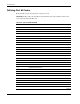
When determining the port 84 code:
•
•
A green LED indicates 1.
An off LED indicates 0.
Therefore, each LED will be assigned either 0 or 1.
HP ProLiant BL40p Server Blade Maintenance and Service Guide 5-3