
ProLiant BL40p Server Blade Maintenance and Service Guide
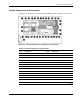
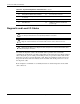
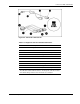
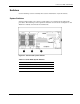
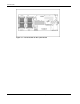

Connectors, LEDs, and Switches
4-10 HP ProLiant BL40p Server Blade Maintenance and Service Guide
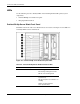
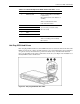
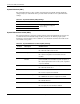
System ID Switch (SW1)
The system ID switch is a three-position switch used for chassis ID. Settings should be
changed only
by an authorized service provider. Refer to Table 4-7 for system ID switch
settings.
Table 4-7: System ID Switch (SW1) Settings
Position Description On/Off Function
1 Chassis ID0
2 Chassis ID1
3 Chassis ID2
All pins will be set to off. HP does
not recommen
d changing this
switch setting.
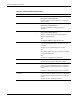
System Maintenance Switch (SW3)
The system maintenance switch is an eight-position
switch that implements protection and
override functions. The default setting for all 8 positions is off. For the proper system
maintenance switch settings, refer to Table 4-8 or to the labels attached to the inside of the
server blade access panel.
Table 4-8: System Maintenance Switch (SW3) Settings
Position Description On/Off Function
1 iLO Security Override Off = iLO Security is enabled.
On = Overrides iLO security function.
2 Configuration lock Off = System configuration can be modified.
On = System configuration is lo
cked and cannot be
modified.
3 iLO Power Button
Override
Off = System power button is controlled through iLO. Rack
power availability is checked before system can power on.
On = System power button turns on the system, regardless
of power avail
ability.
4 Enable Diskette Boot Off = Diskette boot is controlled by configuration.
On = Override diskette boot.
5 Password Disable Off = Power-on password is normal.
On = Power-on password is disabled.
6 Invalidate Configuration Off = Normal.
On = ROM treats the system configuration as invalid.
7 Interlock Disable Off = Normal.
On = Disable interlock.
8 Hot Spare Boot Disable Off = Hot spare boot is enabled.
On = Hot spare boot functionality is disabled.