
ProLiant BL40p Server Blade Maintenance and Service Guide
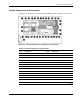

Connectors, LEDs, and Switches
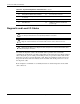
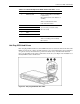
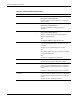
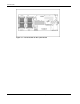
Table 4-4: ProLiant BL40p Server Blade Front Panel LEDs continued
Item LED Description Status
3 External health Green = Normal (when server blade
is powered on)
Off = Normal (when server blade is on
standby)
Amber = Redundant fan failed
Red = Critical fan failure
4 NIC 1
5 NIC 2
6 NIC 3
7 NIC 4
8 NIC 5
Green = Linked to network
Green flashing = Network activity
Off = No activity
9 Power On/Standby Green = On
Amber = Standby (power available)
Off = Unit off
Hot-Plug SCSI Hard Drives
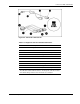
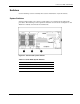
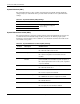
Each hot-plug SCSI hard drive has three LED indicators located on the front of the drive. The
LEDs provide activity, online, and fault status for each corresponding drive when configured
as a part of an array and attached to a powered-on Smart Array controller. Their behavior
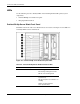
may vary depending on the status of other drives in the array. Use Figure 4-6 and Table 4-5 to
identify LED locations and functions.
Figure 4-6: Hot-plug SCSI hard drive LEDs
HP ProLiant BL40p Server Blade Maintenance and Service Guide 4-7