
ProLiant BL40p Server Blade Maintenance and Service Guide
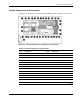
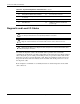

Connectors, LEDs, and Switches
LEDs
Use the following section to identify LEDs on the following ProLiant BL p-Class system
components:
•
•
ProLiant BL40p server blade front panel
Hot-plug SCSI hard drives
ProLiant BL40p Server Blade Front Panel
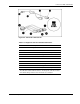
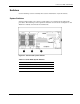
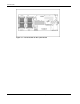
Six LEDs on the front of the server blade indicate server status. Use Figure 4-5 and Table 4-4
to identify LED locations and functions.
Figure 4-5: ProLiant BL40p server blade front panel LEDs
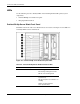
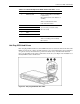
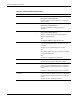
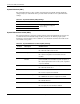
Table 4-4: ProLiant BL40p Server Blade Front Panel LEDs
Item LED Description Status
1 Unit identification Blue = Flagged
Blue flashing = Management mode
Off = No remote management
2 Internal health Green = Normal (when server blade
is powered on)
Off = Normal (when server blade is on
standby)
Amber = System degraded
Red = System critical
continued
4-6 HP ProLiant BL40p Server Blade Maintenance and Service Guide