
ProLiant BL40p Server Blade Maintenance and Service Guide

Removal and Replacement Procedures
HP ProLiant BL40p Server Blade Maintenance and Service Guide 2-41
Server Blade Blanks
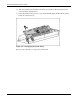
To remove a server blade blank:
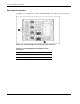
1. Press the release buttons simultaneously (1).
2. Slide the server blade blank from the server blade enclosure (2).
Figure 2-40: Removing a server blade blank
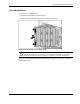
CAUTION: Always populate server blade enclosure bays with either a server blade or server
blade blank. Operating the server blade enclosure without a server blade or server blade
blank results in improper airflow and improper cooling that can lead to thermal damage.
To replace a server blade blank, align the blank with the empty bay and slide it in until the
blank is fully seated.