
ProLiant BL40p Server Blade Maintenance and Service Guide

Removal and Replacement Procedures
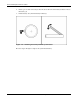
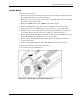
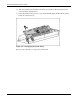
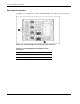
12. Slide the system board toward the front of the server blade (1). Be sure that the board
unseats from the alignment keys.
13. Using the handles on the processor cages and the PCI-X support handle, lift the system
board out of the chassis (2).
Figure 2-39: Disengaging the system board
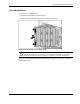
Reverse steps 1 through 13 to replace the system board.
2-40 HP ProLiant BL40p Server Blade Maintenance and Service Guide