
ProLiant BL40p Server Blade Maintenance and Service Guide

Removal and Replacement Procedures
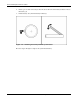
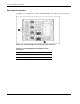
4. Insert a pen or other narrow object into the slot at the front of the battery holder to release
the battery (1).
5. Lift the battery away from the battery holder (2).
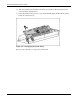
Figure 2-37: Removing the battery from the system board
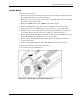
Reverse steps 1 through 5 to replace the system board battery.
2-38 HP ProLiant BL40p Server Blade Maintenance and Service Guide