
ProLiant BL40p Server Blade Maintenance and Service Guide

Removal and Replacement Procedures
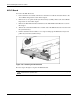
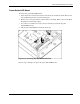
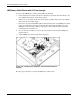
5. Remove the processor fan baffle. Refer to the “Processors” se ction in this chapter (1).
6. Remove cable by releasing the retaining clip on the side of the chassis (2).
7. Disconnect I/O pass-through cable from the LED/power switch board (3).
Figure 2-34: Removing the LED/power switch board and cables
Reverse steps 1 through 7 to replace the I/O pass-through board.
2-34 HP ProLiant BL40p Server Blade Maintenance and Service Guide