
ProLiant BL40p Server Blade Maintenance and Service Guide

Removal and Replacement Procedures
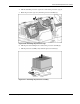
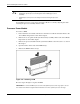
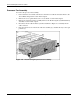
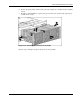
6. Press in the spring locks on either side of the fan assembly (1), and slide the fan assembly
out (2).
7. To remove an individual fan, squeeze the port-colored levers on either side of the fan (3),
and lift the fan out (4).
Figure 2-27: Removing the processor fan assembly
Reverse steps 1 through 6 to replace the processor fan assembly.
HP ProLiant BL40p Server Blade Maintenance and Service Guide 2-27