
ProLiant BL40p Server Blade Maintenance and Service Guide

Removal and Replacement Procedures
Battery-Backed Write Cache Enabler
To remove the Smart Array 5i Battery-Backed Write Cache Enabler:
1. Power down the server blade and remove it from the server blade enclosure. Refer to the
“Server Blad e Preparation” section in this chapter.
2. Remove the access panel. Refer to the “ Access Panel” section in this chapter.
3. Remove the DC power converter from the system board. Refer to the label on the DC
power converter.
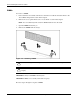
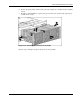
4. Disconnect the battery module cable from the Smart Array 5i Plus memory module.
IMPORTANT: If the data in the Smart Array 5i Battery-Backed Write Cache Enabler needs to be
saved, do not disconnect the battery module cable.
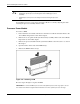
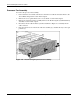
Figure 2-24: Disconnecting the Battery-Backed Write Cache
Enabler
2-24 HP ProLiant BL40p Server Blade Maintenance and Service Guide