
ProLiant BL40p Server Blade Maintenance and Service Guide

Removal and Replacement Procedures
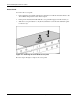
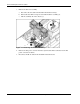
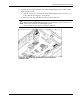
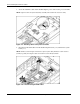
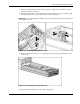
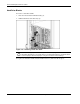
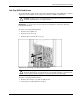
5. Open the slate blue alignment guide (1).
6. Install the host-bus adapter card into PCI-X slot 1 (2).
7. Close the slate blue alignment guide (3).
8. Close the release lever (4).
Figure 2-14: Installing a host-bus adapter card
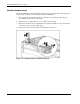
9. Repeat steps 2 through 6 for PCI-X slot 2 if installing an additional host-bus adapter card.
10. Reinstall the access panel.
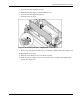
11. Install the server blade into the server blade enclosure.
12. Cable the host-bus adapter card as necessary. Refer to the documentation included with
the host-bus adapter card.
HP ProLiant BL40p Server Blade Maintenance and Service Guide 2-15