
ProLiant BL40p Server Blade Maintenance and Service Guide

Removal and Replacement Procedures
Host-Bus Adapter Cards
The ProLiant BL40p server blade PCI-X expansion slots support only fibre channel host-bus
adapter cards. To install a host-bus adapter card into a PCI-X slot:
1. Power down the server blade and remove it from the server blade enclosure. Refer to
“Server Blad e Preparation” in this chapter.
2. Remove the access panel. Refer to “A ccess Panel” in this chapter.
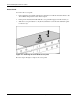
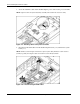
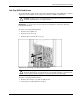
3. Remove the host-bus adapter card blank corresponding to PCI-X slot 1 by pressing down
on the release lever (1), then pulling up (2).
4. Slide the slate blue host-bus adapter card blank out of the slot (3).
Figure 2-13: Removing host-bus adapter card blanks
2-14 HP ProLiant BL40p Server Blade Maintenance and Service Guide