
ProLiant BL40p Server Blade Maintenance and Service Guide

Removal and Replacement Procedures
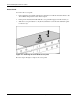
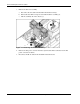
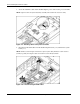
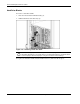
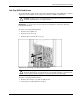
6. Carefully disconnect the SCSI I2C cable and the SCSI backplane power cable from the
SCSI backplane board:
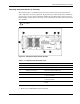
a. Open the chassis doors on either side of the SCSI backplane board for easier access
to the cables. Refer to Figure 2-31 for details.
b. Pinch the cable clips, and pull the cables out of the connectors.
CAUTION: The SCSI I2C cable and the SCSI backplane power cable must remain
attached to the system board at this point. To avoid damaging the system board, remove
only the ends connected to the SCSI backplane board.
Be sure to pinch the cable clips before pulling the cables out.
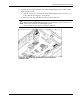
Figure 2-8: Disconnecting the SCSI I2C cable and the SCSI
backplane cable
HP ProLiant BL40p Server Blade Maintenance and Service Guide 2-11