
ProLiant BL40p Server Blade Maintenance and Service Guide

Removal and Replacement Procedures
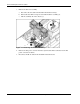
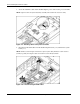
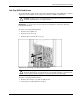
3. Remove the three-fan assembly:
a. Disconnect the fan cable from the PCI-X mezzanine board (1).
b. Pull out the slate blue fan clips located underneath the assembly (2).
c. Lift the assembly out of the chassis (3).
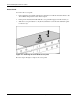
Figure 2-7: Removing the three-fan assembly
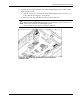
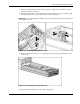
4. Remove the DC power converter from the system board. Refer to the label on the DC
power converter for details.
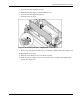
5. Disconnect the RJ-45 cables from the PCI-X mezzanine board.
2-10 HP ProLiant BL40p Server Blade Maintenance and Service Guide