
ProLiant BL40p Server Blade Maintenance and Service Guide


Removal and Replacement Procedures
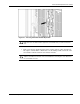
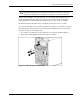
Figure 2-2: Unlocking the server blade from the server blade
enclosure
b. Press the button to release the locking lever (1).
c. Pull open the locking lever (2).
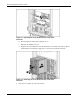
d. Grasp the lever and slide the server blade from the server blade enclosure (3). Place a
hand under the server blade to support it as you remove it from the enclosure.
Figure 2-3: Removing the server blade from the server blade
enclosure
4. Place the server blade on a flat, level surface.
2-6 HP ProLiant BL40p Server Blade Maintenance and Service Guide