
ProLiant BL40p Server Blade Maintenance and Service Guide

Removal and Replacement Procedures
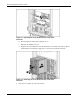
Figure 2-1: Pressing the Power On/Standby button
CAUTION: After you press the release button, the server blade is unlocked from the server
blade enclosure. Use both hands to support the server blade when you remove it from the
rack.
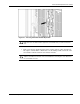
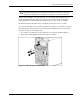
3. Remove the server blade from the server blade enclosure:
a. If the server blade is installed in either of the end bays and has a fibre channel host-
bus adapter card installed in a PCI-X slot, raise the locking handle at the back of the
server blade to unlock it from the server blade enclosure.
CAUTION: To avoid damaging the equipment, be sure to unplug any fibre channel host-bus
adapter card cables from the rear of the server blade before removing the server blade from
the server blade enclosure.
HP ProLiant BL40p Server Blade Maintenance and Service Guide 2-5