
HP ProLiant BL40p Server Blade Maintenance and Service Guide


Port 84 Codes
Defining Port 84 Codes
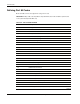
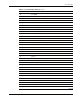
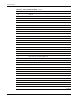
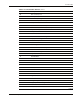
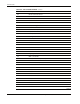
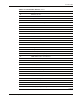
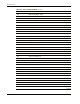
Refer to Table 5-4 for a description of each port 84 code.
IMPORTANT: iLO port 84 codes may differ from port 84 LED codes. Table 5-4 defines port 84 codes
for the system board port 84 LEDs only.
Table 5-4: Port 84 Codes Defined
Port 84 Code Description
00 Init flags, MSW, IDTLIM
01 8042 Initialization/self-test
02 8042 received read command
03 No response from 8042
04 Look for manufacturing ROM at E0000
05 Look for manufacturing ROM at C8000
06 No manufacturing ROMs
07 Read CMOS reset code
08 Init 8259, 80287
09 Jump indirect indexed by reset code
0A Vector via 40:67 reset function
0B Vector via 40:67 with EOI function
0C Boot reset function
0D Test #2 8254 counter 0
0E Test #2 8254 counter 2
0F Warm Boot
10 PPI disabled, Program timers 0 & 1
11 Turn off disk motors
12 Initialize PICs and Timers
13 Test timer 0
14 Disable RTC interrupts
15 Check battery power
16 CMOS Battery has lost power
17 Clear CMOS_DIAGS
18 Test base memory (first 128K)
19 Clear and init base memory
1A Unused
1B Test the system ROM (not used in E12)
continued
5-6 HP ProLiant BL40p Server Blade Maintenance and Service Guide