
HP ProLiant BL40p Server Blade Maintenance and Service Guide

Removal and Replacement Procedures
PCI-X Mezzanine Board
To remove the PCI-X mezzanine board:
1. Power down the server blade and remove it from the server blade enclosure. Refer to
“Server Blade Preparation” in this chapter.
2. Remove the access panel and the system board tray assembly. Refer to “Server Blade
Preparation” in this chapter.
3. Disconnect RJ-45 cables from the PCI-X mezzanine board.
4. Remove any host-bus adapter cards installed in the PCI-X mezzanine board. Refer to
“Host-Bus Adapter Cards” in this chapter.
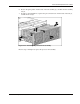
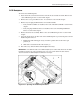
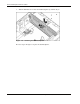
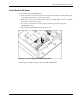
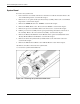
5. Simultaneously raise the two slate blue release levers to a 90° angle (1).
6. Lift the PCI-X mezzanine board off of the system board (2).
Figure 2-29: Removing the PCI-X mezzanine board
Reverse steps 1 through 6 to replace the PCI-X mezzanine board.
HP ProLiant BL40p Server Blade Maintenance and Service Guide 2-29